Import your Firstrade trades into a portfolio tracker
Export your transaction history from Firstrade and upload the file to Pulsarium's free cabinet: every trade is checked with you before it is saved, and your broker login never leaves your hands.
Free during the public beta · No broker login needed · Two-factor sign-in
1. Export the file from Firstrade
Open the Tax CenterLog in to Firstrade and open the Tax Center; choose the account information download.
Download the history as CSVPick Excel CSV, the account and the date range, then save the file (it is named like FT_CSV_12345678.csv).
2. Import it into Pulsarium
Upload the fileIn the cabinet open Account → Export / Import CSV → Import from a broker and choose the file. CSV and TSV work; save an Excel file as CSV first.
Check the columnsPick the target portfolio. Pulsarium suggests the broker from the file name and pre-selects the date, operation, instrument, quantity, price and fee columns — check them and whether dates are day- or month-first. After a successful import the column choices for that file format are remembered on your device.
Review every rowClick Review rows. Each trade is matched to a listing (the exchange is named, the most likely one is marked best match), already imported rows are skipped and possible duplicates are flagged. Nothing is saved until you confirm.
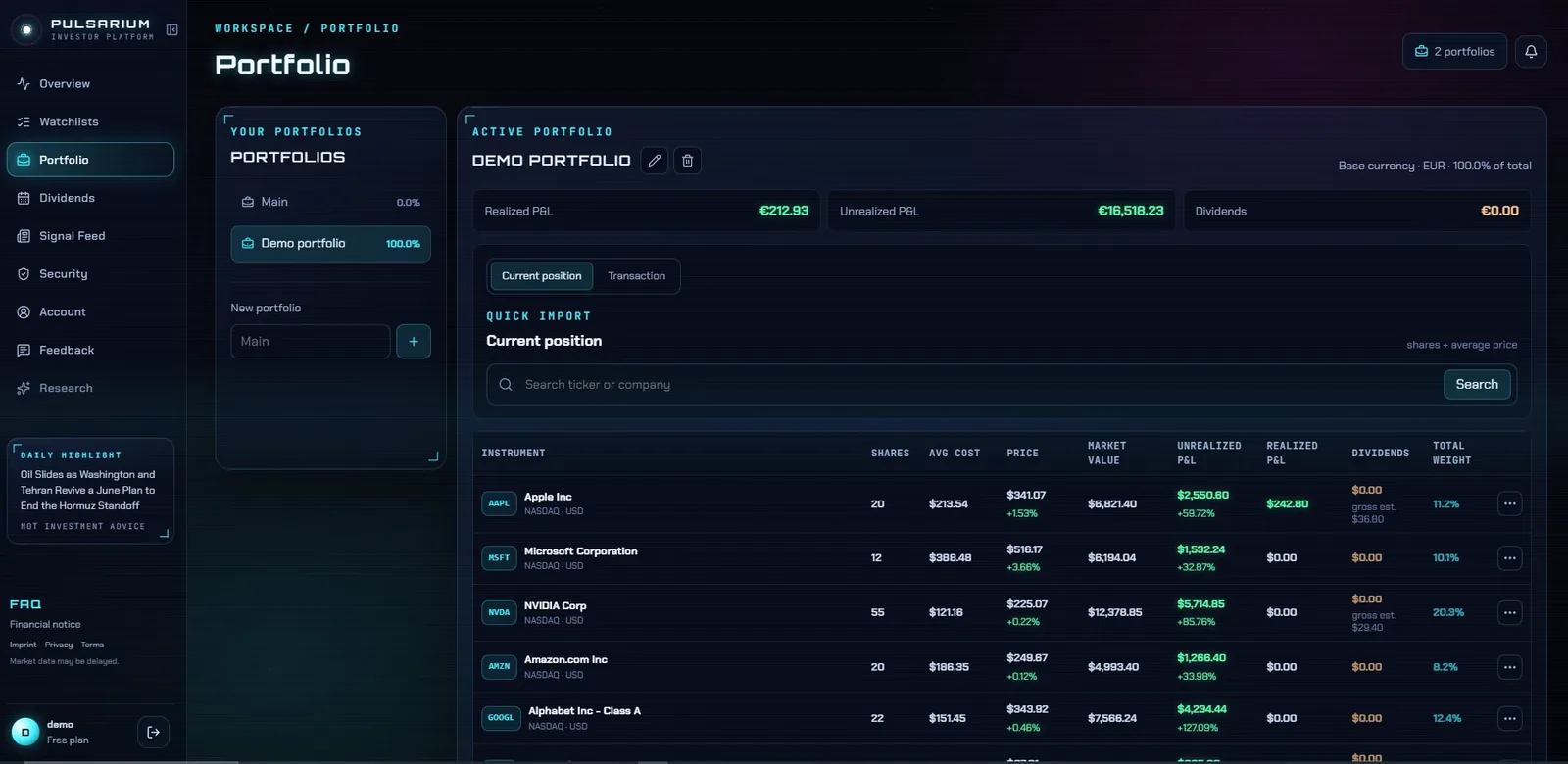
After the import: every position with its average cost, P&L, dividends and weight. Demo account with sample data.
What Pulsarium does with a Firstrade file
Buys, sells and dividends
Firstrade's BUY, SELL and DIVIDEND rows are read directly; a non-resident tax withheld on a dividend is added to that dividend.
Cash left out
Interest, wires and other money movements hold no shares and are skipped on their own.
Questions
Which Firstrade file do I need?
The account history from the Tax Center, in Excel CSV format. The gain/loss download is a tax report, not your trade history.
I'm not a US resident — what about the withholding tax?
Firstrade books the tax withheld on a dividend as a separate row; Pulsarium adds it to the dividend, so you see the gross amount and the tax.
Do I have to connect my broker account?
No. Pulsarium never asks for broker logins. You export a transaction file from your broker and upload it, or add trades by hand. Nothing reaches your broker account.
Is Pulsarium free?
Yes. The personal cabinet is free during the public beta: portfolios, dividends, watchlists, price alerts, broker import and the news feed. Paid plans with an AI research assistant are planned; the free features stay available.